Why a separate password app is one app too many
Most families already juggle a notes app full of passwords, a gallery full of document photos and a calendar full of EMI dates. OnlyWallet puts logins next to the things they belong to: your net banking login sits beside your bank account details, your insurer's portal beside the policy. One master password protects all of it, and one search finds any of it.
What a login holds
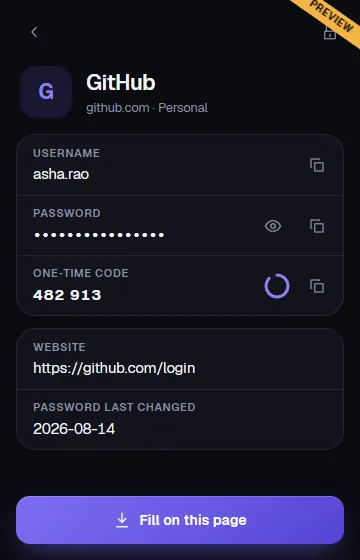
- Site or app name and website address, used to match the right login when you autofill.
- Username or email and password, both encrypted. Reveal a password with a tap; it hides itself again after 30 seconds.
- Authenticator key for two-factor codes. OnlyWallet shows the current code with a countdown, so one app replaces your authenticator for these accounts.
- Password last changed, so the health check can tell you which passwords are getting old.
- Notes, encrypted and never added to search.
Generator and password health
Generate a random password or an easy-to-type passphrase from the dashboard or right inside the login form. The health score looks for weak passwords, passwords reused across sites, old passwords and logins without a two-factor key. It is worked out in memory when you open it; reuse is detected by comparing short-lived hashes that are never stored.
The master password strength meter is tuned for Indian habits too. It marks down common choices such as cricket, team and city names, dictionary words, keyboard rows and simple letter swaps like @ for a.
Autofill on Android and in your browser
On Android, choose OnlyWallet as the autofill service. Tap a login field in an app or browser, pick Unlock OnlyWallet, and choose the login. You see which app or website is asking before anything is filled. Websites are trusted only from known browsers with verified signatures, so a look-alike app cannot pretend to be your bank's website.
On a computer, the OnlyWallet extension for Chrome and Edge adds an icon to login fields and offers to save new logins after you sign in. It never fills on insecure http pages.
Private by design
Your passwords are encrypted on your device before they are saved, under a key that only your master password or recovery phrase can unlock. OnlyWallet does not fetch website icons, because that would tell a third party which sites you use; logins show a letter avatar instead. Read the security design for the details.