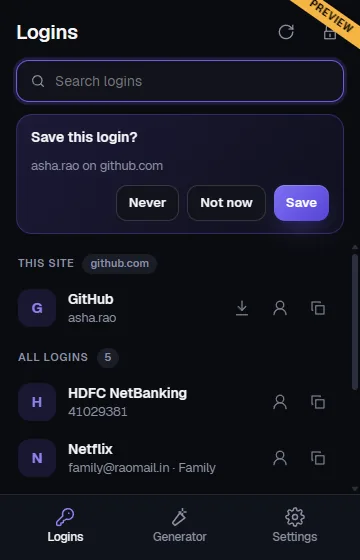
What it does
- Fill on the page. An OnlyWallet icon appears in login fields. Click it, pick a login, and it fills.
- Save and update. After you sign in somewhere new, it offers to save the login, or to update it if the username already exists. Say never for sites you do not want saved.
- One-time codes. Copy the current two-factor code with its countdown, right in the popup.
- Generator. Passwords of 8 to 64 characters, or passphrases of 3 to 12 words.
- Shared logins. Logins from your family and group spaces are listed too, read-only.
Careful about where it fills
The extension matches the exact website first, then the same site on another subdomain only after you confirm. It never fills on insecure http pages, and a login saved for an https site never matches an http page. A page cannot trigger a fill by itself: it happens only when you click.
Locks when you step away
The extension locks after a period without activity that you choose, from 1 minute to 4 hours (15 minutes by default), and whenever your computer locks or the browser closes. Locking wipes the keys and every decrypted value. Copied passwords are cleared from the clipboard after 30 seconds by default.
Same encryption as the app
It unlocks with your master password using the same Argon2id key derivation as the app and reads the same encrypted records, so nothing readable ever leaves your browser. See the security design.
Getting it
The extension is coming soon to the Chrome Web Store and Microsoft Edge Add-ons. Until it is listed, use the web app to view and copy your logins. Check the download page for every platform.